Documentation Mercado Libre
Check out all the necessary information about APIs Mercado Libre.
Documentation
First steps
So, look at the technical flow to get quality items with size chart associated:
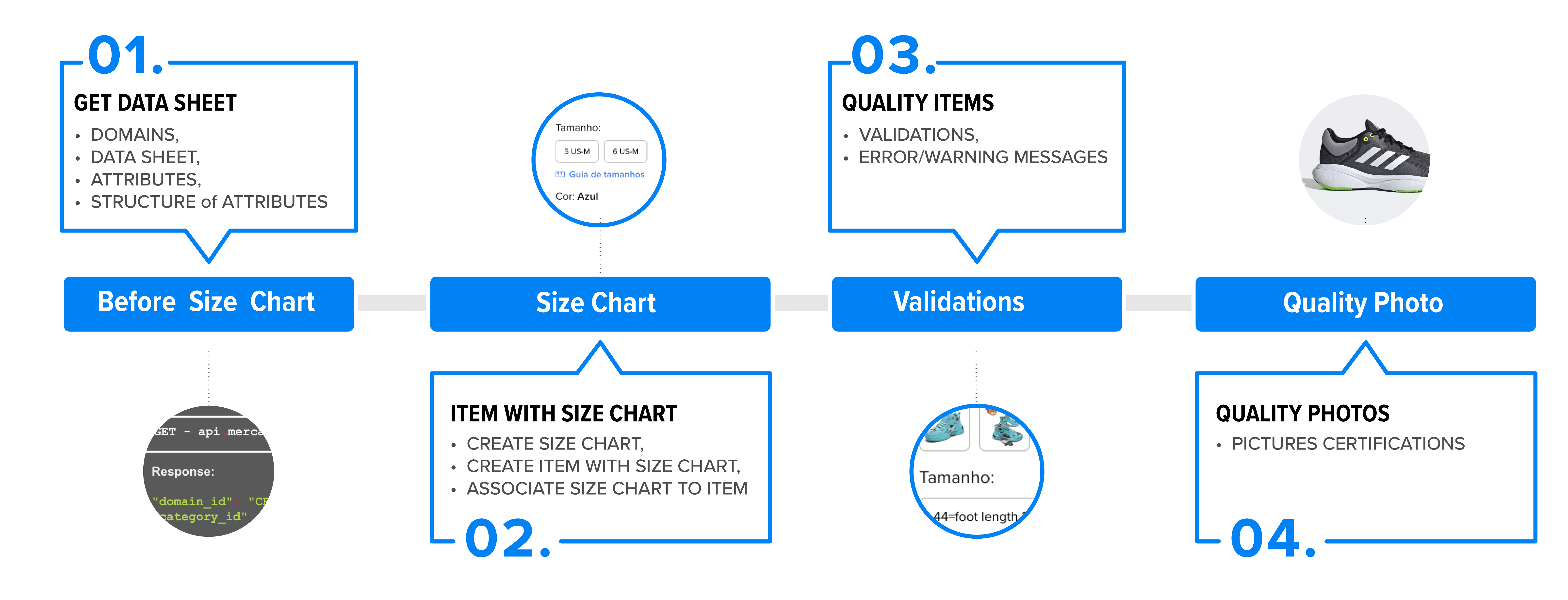
- Get data sheet: with this documentation.
- Manage Size Chart: using all data sheet information.
- Quality items (validations): validate all possible errors and messages of recommendations.
- Recommendations for Quality photo: check the certifications about your photos.
Define fashion domain to publish
To advance in the publication flow of a fashion article with an associated size chart, use the category predictor and get the domain_id on which it will be published.
Example
curl -H 'Authorization: Bearer $ACCESS_TOKEN' -X GET https://api.mercadolibre.com/marketplace/domain_discovery/search?q=Boots for womanResponse:
[
    {
        "domain_id": "CBT-BOOTS_AND_BOOTIES",
        "domain_name": "Boots and booties",
        "category_id": "CBT414251",
        "category_name": "Boots & Booties",
        "attributes": []
    }
]
Available domains for size chart
Then, check if the domain_id matches with one of available domains to associate size charts. See the available domains id to create size chart:
Request:
curl -X GET -H 'Authorization: Bearer $ACCESS_TOKEN' https://api.mercadolibre.com/catalog/charts/CBT/configurations/active_domainsResponse:
{
    “domains”: [
        {
            “domain_id”: “CBT-SNEAKERS”
        },

        {
            “domain_id”: “CBT-T_SHIRTS”
        },
        {
            “domain_id”: “CBT-PANTS”
        }
 ]
}
Check product specification sheet of domain
Once you have the category and domain identified for the listing, it is necessary to check the /domains/$domain_id/technical_specs feature and check the product specification sheet of the domain recognizing the attributes with value_type: grid_id and grid_row_id that will enable to link the size chart information when creating or editing a listing.
Additionally, it is necessary to recognize those attributes with the grid_template_required tag, which will be required for searching the product specification sheet of the size chart.
Request:
curl -X GET -H 'Authorization: Bearer $ACCESS_TOKEN' https://api.mercadolibre.com/domains/$DOMAIN_ID/technical_specsExample that checks the product specification sheet of CBT-SNEAKERS domain:
curl -X GET -H 'Authorization: Bearer $ACCESS_TOKEN' https://api.mercadolibre.com/domains/CBT-SNEAKERS/technical_specsResponse with the details of the domain's datasheet:
{
    "input": {
        "groups": [
            {
                "id": "MAIN",
                "label": "Características principales",
                "relevance": 1,
                "section": "SPECIFICATIONS",
                "ui_config": {},
                "components": [
                    {
                        "component": "COMBO",
                        "label": "Brand",
                        "ui_config": {
                            "hint": "Indicate the actual brand of the product or 'Generic' if it has no brand.",
                            "allow_custom_value": true,
                            "allow_filtering": true
                        },
                        "attributes": [
                            {
                                "id": "BRAND",
                                "name": "Brand",
                                "value_type": "string",
                                "value_max_length": 255,
                                "tags": [
                                    "catalog_listing_required",
                                    "grid_filter",
                                    "catalog_required",
                                    "required"
                                ],
                                "values": [
                                    {
                                        "id": "8716514",
                                        "name": "Asics"
                                    },
                                    {},
                                    {},
                                    {},
                                    {},
                                    {},
                                    {}
                                ],
                                "hierarchy": "PARENT_PK",
                                "relevance": 1
                            }
                        ],
                        "unified_units": []
                    },
                    {},
                    {},
                    {},
                    {
                        "component": "COMBO",
                        "label": "Gender",
                        "ui_config": {
                            "allow_custom_value": false,
                            "allow_filtering": true
                        },
                        "attributes": [
                            {
                                "id": "GENDER",
                                "name": "Gender",
                                "value_type": "list",
                                "tags": [
                                    "catalog_listing_required",
                                    "grid_template_required",
                                    "grid_filter",
                                    "catalog_required",
                                    "required"
                                ],
                                "values": [
                                    {
                                        "id": "339665",
                                        "name": "Woman"
                                    },
                                    {
                                        "id": "339666",
                                        "name": "Man"
                                    },
                                    {
                                        "id": "339668",
                                        "name": "Girls"
                                    },
                                    {
                                        "id": "110461",
                                        "name": "Gender neutral"
                                    },
                                    {
                                        "id": "339667",
                                        "name": "Boys"
                                    },
                                    {
                                        "id": "19159491",
                                        "name": "Gender neutral kid"
                                    }
                                ],
                                "hierarchy": "PARENT_PK",
                                "relevance": 1
                            }
                        ],
                        "unified_units": []
                    },
                    {
                        "component": "COMBO",
                        "label": "Age group",
                        "ui_config": {
                            "allow_custom_value": false,
                            "allow_filtering": true
                        },
                        "attributes": [
                            {
                                "id": "AGE_GROUP",
                                "name": "Age group",
                                "value_type": "list",
                                "tags": [
                                    "hidden",
                                    "read_only",
                                    "grid_filter"
                                ],
                                "values": [
                                    {
                                        "id": "6725189",
                                        "name": "Adults"
                                    },
                                    {
                                        "id": "1065183",
                                        "name": "Kids"
                                    }
                                ],
                                "hierarchy": "PARENT_PK",
                                "relevance": 1
                            }
                        ],
                        "unified_units": []
                    },
                    {},
                    {},
                    {},
                    {},
                    {},
                    {
                        "component": "GRID_ROW_INPUT",
                        "label": "Size grid row ID",
                        "ui_config": {
                            "allow_custom_value": false,
                            "allow_filtering": false
                        },
                        "attributes": [
                            {
                                "id": "SIZE_GRID_ROW_ID",
                                "name": "Size grid row ID",
                                "value_type": "grid_row_id",
                                "value_max_length": 255,
                                "tags": [
                                    "vip_hidden",
                                    "hidden",
                                    "variation_attribute"
                                ],
                                "hierarchy": "CHILD_PK",
                                "relevance": 1
                            }
                        ],
                        "unified_units": []
                    },
                    { }
                        ]
                    }
                ]
            }
        ]
    }
}
Check the product specification sheet of the size chart
To create a new size chart we must specify the structure of its attributes, therefore, it is necessary to make a POST to the /domains/$domain_id/technical_specs?section=grids feature by uploading to the body all the attributes recognized when checking the product specification sheet of the domain with the grid_template_required tag.
There are three types of size charts: Brand(BRAND) or customized/specific (SPECIFIC).
Request:
curl -X POST -H 'Authorization: Bearer $ACCESS_TOKEN' -H "Content-Type: application/json" https://api.mercadolibre.com/domains/$DOMAIN_ID/technical_specs/?section=gridsExample
curl -X POST -H 'Authorization: Bearer $ACCESS_TOKEN' -H "Content-Type: application/json" https://api.mercadolibre.com/domains/CBT-SNEAKERS/technical_specs/?section=gridsResponse:
{
"input": {
"groups": [
{
"id": "SIZE_CHART",
"label": "Size Guide",
"relevance": 1,
"section": "GRIDS",
"ui_config": {},
"components": [
{
"component": "GRID",
"label": "Size Guide",
"ui_config": {
"max_allowed": 75,
"allow_custom_value": true,
"allow_filtering": false
},
"components": [
{
"component": "TEXT_OUTPUT",
"label": "Brand",
"ui_config": {},
"attributes": [
{
"id": "BRAND",
"name": "Brand",
"value_type": "string",
"value_max_length": 255,
"tags": [
"catalog_listing_required",
"grid_filter",
"catalog_required",
"required"
],
"hierarchy": "PARENT_PK",
"relevance": 1
}
],
"unified_units": []
},
{
"component": "TEXT_OUTPUT",
"label": "Gender",
"ui_config": {},
"attributes": [
{
"id": "GENDER",
"name": "Gender",
"value_type": "string",
"tags": [
"catalog_listing_required",
"grid_template_required",
"grid_filter",
"catalog_required",
"fixed",
"required"
],
"values": [
{
"id": "339665",
"name": "Woman"
},
{
"id": "339666",
"name": "Man"
},
{
"id": "339668",
"name": "Girls"
},
{
"id": "110461",
"name": "Gender neutral"
},
{
"id": "339667",
"name": "Boys"
},
{
"id": "19159491",
"name": "Gender neutral kid"
}
],
"hierarchy": "PARENT_PK",
"relevance": 1
}
],
"unified_units": []
},
{
"component": "TEXT_INPUT",
"label": "Age group",
"ui_config": {},
"attributes": [
{
"id": "AGE_GROUP",
"name": "Age group",
"value_type": "string",
"value_max_length": 255,
"tags": [
"hidden",
"read_only",
"grid_filter"
],
"hierarchy": "PARENT_PK",
"relevance": 1
}
],
"unified_units": []
},
{
"component": "TEXT_INPUT",
"label": "Style",
"ui_config": {},
"attributes": [
{
"id": "STYLE",
"name": "Style",
"value_type": "string",
"value_max_length": 255,
"tags": [
"catalog_listing_required",
"grid_filter",
"required"
],
"hierarchy": "FAMILY",
"relevance": 1
}
],
"unified_units": []
},
{
"component": "TEXT_INPUT",
"label": "Recommended sports",
"ui_config": {},
"attributes": [
{
"id": "RECOMMENDED_SPORTS",
"name": "Recommended sports",
"value_type": "string",
"value_max_length": 255,
"tags": [
"multivalued",
"grid_filter"
],
"hierarchy": "FAMILY",
"relevance": 1
}
],
"unified_units": []
},
{
"component": "LINKED_BY_CONNECTOR_INPUT",
"label": "Foot length",
"ui_config": {
"connector": " - ",
"hint": "From - To"
},
"attributes": [
{
"id": "FOOT_LENGTH",
"name": "Foot length",
"value_type": "number_unit",
"value_max_length": 255,
"tags": [
"required"
],
"default_unit_id": "cm",
"units": [
{
"id": "\"",
"name": "\""
},
{
"id": "cm",
"name": "cm"
}
],
"hierarchy": "CHILD_DEPENDENT",
"relevance": 3
},
{
"id": "FOOT_LENGTH_TO",
"name": "Foot length to",
"value_type": "number_unit",
"value_max_length": 255,
"tags": [],
"default_unit_id": "cm",
"units": [
{
"id": "\"",
"name": "\""
},
{
"id": "cm",
"name": "cm"
}
],
"hierarchy": "CHILD_DEPENDENT",
"relevance": 3
}
],
"default_unified_unit_id": "cm",
"unified_units": [
{
"id": "\"",
"name": "\""
},
{
"id": "cm",
"name": "cm"
}
]
},
{
"component": "TEXT_INPUT",
"label": "Manufacturer size",
"ui_config": {
"allow_custom_value": false,
"allow_filtering": false
},
"attributes": [
{
"id": "MANUFACTURER_SIZE",
"name": "Manufacturer size",
"value_type": "string",
"value_max_length": 255,
"tags": [
"unique",
"main_attribute_candidate"
],
"hierarchy": "ITEM",
"relevance": 1
}
],
"unified_units": []
},
{
"component": "NUMBER_UNIT_INPUT",
"label": "BR",
"ui_config": {
"allow_custom_value": false,
"allow_filtering": false
},
"attributes": [
{
"id": "BR_SIZE",
"name": "BR",
"value_type": "number_unit",
"value_max_length": 255,
"tags": [
"main_attribute_candidate"
],
"default_unit_id": "BR",
"units": [
{
"id": "BR",
"name": "BR"
}
],
"hierarchy": "CHILD_PK",
"relevance": 1
}
],
"default_unified_unit_id": "BR",
"unified_units": [
{
"id": "BR",
"name": "BR"
}
]
},
{
"component": "NUMBER_UNIT_INPUT",
"label": "MX",
"ui_config": {
"allow_custom_value": false,
"allow_filtering": false
},
"attributes": [
{
"id": "MX_SIZE",
"name": "MX",
"value_type": "number_unit",
"value_max_length": 255,
"tags": [
"main_attribute_candidate"
],
"default_unit_id": "MX",
"units": [
{
"id": "MX",
"name": "MX"
}
],
"hierarchy": "CHILD_PK",
"relevance": 1
}
],
"default_unified_unit_id": "MX",
"unified_units": [
{
"id": "MX",
"name": "MX"
}
]
},
{
"component": "NUMBER_UNIT_INPUT",
"label": "CL",
"ui_config": {
"allow_custom_value": false,
"allow_filtering": false
},
"attributes": [
{
"id": "CL_SIZE",
"name": "CL",
"value_type": "number_unit",
"value_max_length": 255,
"tags": [
"main_attribute_candidate"
],
"default_unit_id": "CL",
"units": [
{
"id": "CL",
"name": "CL"
}
],
"hierarchy": "CHILD_PK",
"relevance": 1
}
],
"default_unified_unit_id": "CL",
"unified_units": [
{
"id": "CL",
"name": "CL"
}
]
},
{
"component": "NUMBER_UNIT_INPUT",
"label": "CO",
"ui_config": {
"allow_custom_value": false,
"allow_filtering": false
},
"attributes": [
{
"id": "CO_SIZE",
"name": "CO",
"value_type": "number_unit",
"value_max_length": 255,
"tags": [
"main_attribute_candidate"
],
"default_unit_id": "CO",
"units": [
{
"id": "CO",
"name": "CO"
}
],
"hierarchy": "CHILD_PK",
"relevance": 1
}
],
"default_unified_unit_id": "CO",
"unified_units": [
{
"id": "CO",
"name": "CO"
}
]
},
{
"component": "NUMBER_UNIT_INPUT",
"label": "US-M",
"ui_config": {
"allow_custom_value": false,
"allow_filtering": false
},
"attributes": [
{
"id": "M_US_SIZE",
"name": "US-M",
"value_type": "number_unit",
"value_max_length": 255,
"tags": [
"main_attribute_candidate"
],
"default_unit_id": "US",
"units": [
{
"id": "US",
"name": "US"
}
],
"hierarchy": "CHILD_PK",
"relevance": 1
}
],
"default_unified_unit_id": "US",
"unified_units": [
{
"id": "US",
"name": "US"
}
]
},
{
"component": "NUMBER_UNIT_INPUT",
"label": "US-F",
"ui_config": {
"allow_custom_value": false,
"allow_filtering": false
},
"attributes": [
{
"id": "F_US_SIZE",
"name": "US-F",
"value_type": "number_unit",
"value_max_length": 255,
"tags": [
"main_attribute_candidate"
],
"default_unit_id": "US",
"units": [
{
"id": "US",
"name": "US"
}
],
"hierarchy": "CHILD_PK",
"relevance": 1
}
],
"default_unified_unit_id": "US",
"unified_units": [
{
"id": "US",
"name": "US"
}
]
},
{
"component": "NUMBER_UNIT_INPUT",
"label": "EU",
"ui_config": {
"allow_custom_value": false,
"allow_filtering": false
},
"attributes": [
{
"id": "EU_SIZE",
"name": "EU",
"value_type": "number_unit",
"value_max_length": 255,
"tags": [
"main_attribute_candidate"
],
"default_unit_id": "EU",
"units": [
{
"id": "EU",
"name": "EU"
}
],
"hierarchy": "CHILD_PK",
"relevance": 1
}
],
"default_unified_unit_id": "EU",
"unified_units": [
{
"id": "EU",
"name": "EU"
}
]
},
{
"component": "NUMBER_UNIT_INPUT",
"label": "UK",
"ui_config": {
"allow_custom_value": false,
"allow_filtering": false
},
"attributes": [
{
"id": "UK_SIZE",
"name": "UK",
"value_type": "number_unit",
"value_max_length": 255,
"tags": [
"main_attribute_candidate"
],
"default_unit_id": "UK",
"units": [
{
"id": "UK",
"name": "UK"
}
],
"hierarchy": "CHILD_PK",
"relevance": 1
}
],
"default_unified_unit_id": "UK",
"unified_units": [
{
"id": "UK",
"name": "UK"
}
]
}
]
}
]
}
]
},
"output": {}
}Consulting a size charts data sheet
The size chart data sheet will determine the structure of the attributes with a size chart in the listing. Following the previous example, execute a POST with the attributes: SPECIFIC (mandatory, type of chart) and all the attributes previously recognized with the grid_template_required tag as GENDER.
Request:
curl -X POST -H 'Authorization: Bearer $ACCESS_TOKEN' -H "Content-Type: application/json" https://api.mercadolibre.com/catalog/charts/searchExample consulting the details of the technical data sheet for a specific size chart (personalized) and the female gender:
    "domain_id": "SNEAKERS",
    "site_id": "CBT",
    "type": "SPECIFIC",
    "seller_id": 1161438226,
    "attributes": [
        {
            "id": "GENDER",
            "values": [
                {
                    "id": "339665",
                    "value" : "Woman"
                }
            ]
        }
    ]
Before carrying out research on the size chart, you should consider the attribute with the grid_template_required tag in the technical sheet that defines the POST attributes. Consider that in all cases, you must send the attributes of: domain, site, seller are mandatory.
If in the body of the POST is sent:
Without the type field, it will return all the results: specific (custom) size chart or brands according to the filters sent in the POST.
type= SPECIFIC: Will return all results: custom size chart sent in the POST, according to the gender to be sent.
type= BRAND: Will return all results: size chart previously established by the brand according to the filters sent in the POST.
Response with the detail of the technical data sheet of the size chart:
 {
    "id": "868447",
    "names": {
        "CBT": "Woman Equiv"
    },
    "domain_id": "SNEAKERS",
    "site_id": "CBT",
    "type": "SPECIFIC",
    "seller_id": 1161438226,
    "main_attribute_id": "UK_SIZE",
    "secondary_attribute_id": "F_US_SIZE",
    "attributes": [
        {
            "id": "GENDER",
            "name": "Gender",
            "values": [
                {
                    "id": "339665",
                    "name": "Woman"
                }
            ]
        }
    ],
    "rows": [
    ]
},
If the search does not return results from the suggested tables, the answer you will get is the following and you must first create a size chart for the seller:
{
   "charts": []
}
If you perform a search with a domain that is not configured with the new size chart, you will receive an error.
{
    "error": "domain_not_active",
    "message": "Domain CBT-HATS_AND_CAPS is not active to be used in charts.",
    "status": 400
}When checking the product specification sheet of size charts in TOPS and BOTTOMS domains, a list data type will be found, which establishes the possible values of a List. These values must be taken into account when creating a customized size chart in these domains:
Consult the tech spec to know all filtrable_size international disponible.
Ex. to filtrable size to T-SHIRT
curl -X GET -H 'Authorization: Bearer $ACCESS_TOKEN' https://api.mercadolibre.com/domains/CBT-T_SHIRTS/technical_specs"attributes": [{
"id": "FILTRABLE_SIZE",
"name": "Equivalencies",
"value_type": "list",
"value_max_length": 255,
"tags": [
"vip_hidden",
"hidden",
"read_only",
"multivalued",
"variation_attribute",
"required"
],
"values": [{
"id": "12917835",
"name": "3XS"
},
{
"id": "12917836",
"name": "2XS"
},
{
"id": "12917776",
"name": "XS"
},
{
"id": "12917796",
"name": "S"
},
{
"id": "12917795",
"name": "M"
},
{
"id": "12917802",
"name": "L"
},
{
"id": "12917787",
"name": "XL"
},
{
"id": "12917846",
"name": "2XL"
},
{
"id": "12917837",
"name": "3XL"
},
{
"id": "12917843",
"name": "4XL"
},
{
"id": "12917842",
"name": "5XL"
},
{
"id": "12917838",
"name": "6XL"
},
{
"id": "12917841",
"name": "7XL"
},
{
"id": "12917845",
"name": "8XL"
},
{
"id": "12917844",
"name": "9XL"
},
{
"id": "12917839",
"name": "10XL"
}
],
"hierarchy": "ITEM",
"relevance": 2
}]For TOPS and BOTTOMS domains, the creation of size guides specifying body measurements or garment measurements is allowed. In both cases, you can recognize them in the technical data sheet through tags BODY_MEASURE or CLOTHING_MEASURE.
Example of the attribute GARMENT_LENGTH_FROM used in garment measurements:
"attributes": [
                                    {
                                        "id": "GARMENT_LENGTH_FROM",
                                        "name": "Garment length from",
                                        "value_type": "number_unit",
                                        "value_max_length": 255,
                                        "tags": [
                                            "CLOTHING_MEASURE",
                                            "required"
                                        ],
                                        "default_unit_id": "cm",
                                        "units": [
                                            {
                                                "id": "\"",
                                                "name": "\""
                                            },
                                            {
                                                "id": "cm",
                                                "name": "cm"
                                            }
                                        ],
                                        "hierarchy": "CHILD_DEPENDENT",
                                        "relevance": 3
                                    },
                                    {
                                        "id": "GARMENT_LENGTH_TO",
                                        "name": "Garment length to",
                                        "value_type": "number_unit",
                                        "value_max_length": 255,
                                        "tags": [
                                            "CLOTHING_MEASURE"
                                        ],
                                        "default_unit_id": "cm",
                                        "units": [
                                            {
                                                "id": "\"",
                                                "name": "\""
                                            },
                                            {
                                                "id": "cm",
                                                "name": "cm"
                                            }
                                        ],
                                        "hierarchy": "CHILD_DEPENDENT",
                                        "relevance": 3
                                    }
                                ],
Next: Manage size chart.